Archive for the ‘Technology’ Category

DVD player from RCA that keeps on giving

Sunday, May 25th, 2008 | 1 Comment »

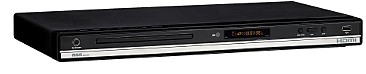
Last Christmas, I decided to help upgrade Rebecca’s aged DVD player by getting something that would help us enjoy home time together. Her old player would get picky about what it would or would not play from time to time, especially any burned media that we would throw into it. So this is what I ended up getting her.

RCA DRC285 DVD Player The RCA DRC285. Our hope is to do the HD upgrade in the future, so that was my main reason for choosing this model due to the HDMI[wiki] outputs. That way when we make that jump, she can watch her “Sex in the City” DVD’s in all their 1080p glory. Plus there is the ongoing education of sharing movies with each other form respective “must see” libraries. The price for this was a great buy, so it was a good situation.

Now here’s the kicker. This little puppy has a USB 2.0 port on the front of it. On a whim, I took a 350MB AVI and put it on a 1GB thumb drive. The remote has a “DVD/USB” button on it, so after plugging it into the USB port, I hit the button, the little LED flickered like it would when being accessed by a computer, and there was the file listed on the screen. I selected it, hit the “OK” button, and the video file loaded.

What we normally did before this was run about a twelve foot A/V cable with RCA connectors[wiki] from the back of the TV to our iMac. The TV then became a second monitor with audio running to it from the computer, giving us the option of watching downloaded video files on our TV. None of that sitting in front of the computer monitor for us.

So with this USB discovery, it was an amazing moment. The video looks superb compared to the output generated from the iMac to standard NTSC video quality. There was a lot of pixelation from fast video movement, but that has changed since we’ve gone to viewing programs off of the thumb drives. I say drives because you can put about two episodes of a program per one, 1GB thumb drive. With two, we cycle through the pair.

Additionally, the DVD player flows right through the list of files. Start with the first one and it plays the next one in order. Oh, and you can also pause and fast forward like a standard DVD.

With our hectic lives, it’s safe to say that this has been a very cool addition to our arsenal of things to disconnect with.

Launch Party Vancouver 3

Monday, February 4th, 2008 | 4 Comments »

I had the opportunity to hang out at Launch Party Vancouver 3 on January 25th at the Lamplighter in Gastown. It was chalk full of all sorts of people in the ever so progressing Vancouver tech scene. Even though that is a geeky thing to say, good and interesting things are happening in the Vancouver tech community.

Kdon taunting Duane

As the wine seemed to be never ending, I took my camera around and took some various shots. Taking photos with flash is never to my liking, but I’m adjusting more and more to how my new toy works. See all of my photos from the night here, but ace photographer Duane was officially on the prowl with his gear here.

Photo by Duane Storey
Photo credit: duanestorey on Flickr

Speaking of photos, one of the reasons we were there is that Rebecca was invited for a photo shoot as being one of the top women in tech here in Vancouver. Can she code in C+? Probably not, but as fast as she has taken to learning PHP and becoming a crack WordPress ninja tells me that she could learn it pretty quick if she wanted to. She also kicks some butt at her day job, so you could say that she’s really on top of her game.

Probably the coolest thing that I can’t stop talking about from that night is the free, 1GB thumb drive that were given away courtesy of Sun. Yes, the same Sun that you are thinking of, and they were there for the official launch of a software platform specifically aimed at helping tech startups be tech startups with their Startup Essentials program. Notice a theme there?

I didn’t take nearly enough time to explore the other folks who were demoing their products at the event as much as I took the opportunity to get caught up with some faces that I haven’t seen in quite sometime. Life has become too hectic to see everyone that I’d like, so it’s good to get a chance to get reacquainted.

Dave and Jordan

If you’d like to see more details on the various folks demoing their latest and greatest, check out launchpartyhq.com.

Looking forward to the next edition of the Launch Party Vancouver. It’s a great way to keep the community in Vancouver familiar with each other. Otherwise, it’d just be a bunch of faceless people with products and URL’s. Gathering for good drink and food is a nice touch, geeking out optional.

Doing the I.T. thing at the South Pole

Wednesday, December 12th, 2007 | No Comments »

Here is something completely geeky, but I find it incredibly fascinating. Slashdot had a link to this article with Henry Malmgren, the I.T. manager to the Amundsen-Scott South Pole Station[wiki]. It’s a long read, but worth it to see how things operate down there, especially on a much heavier, tech level than most people probably think.

And truth be told, yours truly is working in this realm of responsibility with my day job, so I guess that’s why I find it even more intriguing. Most of the time, the biggest concern is making sure that equipment doesn’t over heat, resulting in failure. This guy, on the other hand, has to make sure everything stays warm enough so things don’t seize up from the -25F temps.

It’s also satisfying to know that the same crap happens no matter where you are in the world.

What takes up most of your time?

Information security has really come to the forefront in our priorities. Right now keeping up with security vulnerabilities and patches and things like that is taking a good third of our time. That’s a change from even two years ago. [computerworld]

It takes a strong person to want to do this type of job that essentially experiences nine months of “winter”, slightly less amount of time seeing the sun rise, and works six days a week, a minimum nine hours a day. Granted that there isn’t a lot of other things to do at the bottom of the world, but you really have to be a solitary individual that enjoys fixing people’s network problems while constantly trying to keep your toes warm.

How to clean mighty mouse

Tuesday, November 6th, 2007 | No Comments »

I know that the post title is grammatically caveman in nature, but that’s exactly what I typed into Google. “how to clean might mouse”. This is what I came up with.

Duane's Wireless Mighty Mouse
Photo credit: duanestorey on Flickr

Of course, I have the wired version of the Mighty Mouse on the iMac, but I’m sure you could apply this idea to the wireless version. When it comes down to it, sometimes the scroll ball, or mighty nipple as Rebecca calls it, gets gunky.

The same procedure can be used to clean the scroll ball on your Mighty Mouse if it has become discolored or dirty. Use a clean lint-free cloth lightly moistened with water. Wipe the ball and the surrounding area, making sure to rotate the ball itself to ensure complete coverage. If the scrolling feels rough or if the scroll ball isn’t scrolling up, down, or side-to-side, hold the mouse upside-down and roll the ball vigorously while cleaning it to help dislodge any particles that may have collected on the internal hardware. [apple]

They even have a little quicktime movie that you can watch to help you out with the process. However, I pulled a bit of a Red Green maneuver and went for my trusty bottle of isopropyl alcohol. Combine that with a good pair of boxers, clean yet lint free as well as soft enough for this job, all is well again.

In all seriousness, I was impressed that Apple had this on their site, including the explanatory video. That’s not only a clever way to provide support to your customer base as much as good marketing. They care. They really, really care. *sniff*

Battery heated hockey skates being tested for the NHL

Friday, October 19th, 2007 | 4 Comments »

Take one hockey skate and stick a battery in it to heat the blade, and this is what you get.

A Canadian-made heated skate blade touted as a means of boosting velocity was approved Tuesday for testing in the National Hockey League.

The Therma Blade will be used by as many as 10 NHL players in games and practices, said the blade’s inventor, Tory Weber of Calgary. The NHL will use this testing phase to examine possible safety issues and the blades’ effect on the ice to determine whether they should be used more widely within the league.

A battery in the back of the skate blade heats up to 5C, helping to reduce friction and push the wearer forward with less work, Weber said.

“It’s very simple technology. A warm blade basically creates a thin film of water and melts the ice,” Weber said. Skaters that use the heated blades, which will retail for about $399, find it’s much like skating on ice that has been freshly groomed by a Zamboni, he added. [cbc]

I have two reactions to this. One is that this is an incredibly neat way of using technology in such a simple way. It makes sense, and the science of it ridiculously smart. My other reaction is one of simply asking, buh?

You can call it complaining and sounding like an old timer, but we’ve come a long way since wooden sticks, skates, and sweaters. Composite sticks, synthetic jerseys, tougher padding made with less material, etc., but this kinda blows my mind.

Not only will you have to suit up, strap on your pads, tape up your shins, and lace everything up, but now you’ll have to make sure you check your batteries. Granted that it’s the equipment manager’s job to make sure that you stuff gets taken care of, but what happens if you start having a bad night on the ice because there is no juice left in your skates?

Imagine the post-game interview in the locker room and the player saying, “I was giving it my all, 110%, but apparently my skates were only at 30% charge capacity. They must have died half way through the third period. Everyone was really giving it their all, but… I’ll just have to get the circuitry in my skates checked out before the next game.”

That being said, I like the concept and am curious to see how it all plays out. Gretzky has given his seal of approval, but I’d really like to hear if this makes that much of a difference. On top of that, does making the blade even hotter allow for better performance? If that were the case and it became an unfair advantage, then that might mean league rules and temperature tests before every game, would it not?

Replacing the home network with the Linksys WRT150N

Wednesday, September 26th, 2007 | 9 Comments »

I’ve been making comments here and there about our home network for the past few weeks, and it all came to a head about a week ago. At first, I was quick to blame Shaw about their service and lack thereof. I know for a fact that there was one day where it was their fault that we had no access for nearly a day, but the problems continued after a quick phone call about the problem.

Out with the old, in with the new

For the past few years, I’ve been using an Asante FriendlyNET FR3004 router (circa 2002) and an Apple Airport Express to create a wired and wireless LAN. Not even a year after buying that Asante of an eye sore, it was discontinued, and the firmware updates stopped not long after. The UI for setting up the thing was never my favorite, but it worked. Well, it worked until about a week or so ago, and the Apple Airport Express has always worked well, now a very handy, travel-sizable WiFi device.

During a recent recording of The Crazy Canucks that ended up being a hodge-podge selection of material due to technical problems, our network went into meltdown. Skype wasn’t working, and the entire bandwidth ground to a halt after that. This was prefaced with slow performance in the days leading up. It wasn’t until that I bypassed the router and went straight into the iMac that the Asante was medically discharged from service.

After some research, Rebecca and I settled on getting a new router. Like my father raised me, I didn’t want to get something that would work as much as it would be a suitable replacement for at least the next three years. Looking at the specs for the WRT150N, it had a few key things that I wanted; four 100/1000 Base-T ports on the back, WPA wireless encryption, and 802.11n capabilities that would support Rebecca’s MacBook.

There were some folks recommending other versions of Linksys routers, namely Duane and Gregg, and those were very much appreciated. For the price and the performance that I’m getting now compared to what I had is very noticeable and quite loved though, and it makes me very happy. I used to think that my PowerBook’s performance over wireless was poor due to it’s age, but it was obviously the poor operation of the old router translating traffic to the Apple Airport Express. It’s nearly a new world, and Rebecca has noticed it as well.

So far, I’m really impressed with the Linksys WRT150N. I spent some time setting it up to allow better functionality with certain programs like iChat or Skype, and the wired connection for the iMac has an increase in performance when loading websites or downloading podcasts. Here’s hoping for the long term, but knowing the interesting things I could do with other Linksys models makes me wonder what other, geeky things I could do with it. I’d just have to brave to try.

I touched an iPhone

Monday, August 20th, 2007 | 5 Comments »

Prior to seeing the Simpsons and after a mind-blowing afternoon on the job (i.e. playing radio at a car dealership in Port Moody), we linked up with John Biehler for some pre-movie, post-BarCampVancouver festivities.

iPhone! John's session is up next
Photo credit: Miss604 on Flickr

John is one of the first folks in Canada to snag an iPhone, even though it is not officially available in this country yet. That’s not to say that you can’t use yours here if you are from the states, but no one is offering service here that allows you to activate it, yet alone use it on their network. The only reason I know that U.S. plans have working functions here is because I happened to be in the same room as the lead singer of the band Yellowcard a number of days ago, and he confirmed this to me when I noticed him fiddling with his own iPhone.

Asking him what he thought of it and using it, his repeated response was, “I just love it. Can’t say more than that.”

So having the chance to sit down with John Biehler the other evening, he put the power of grayskull in my hand. I know that sounds corny, if you get the reference at all, but this was a really unique experience that made you realize that you have a very powerful device in your hand.

John and John and the iPhone
Photo credit: Miss604 on Flickr

John has hacked the iPhone enough to get nearly all the features to work, minus the phone, at least while he is in Canada. Memory can’t recall if he activated the phone in the U.S., where he bought it, but the session that he led at BarCampVancouver earlier in the day was all about hacking into the iPhone for those of us north of the border.

Post BarCamp/Pre-Simpsons Movie beverage
Photo credit: retrocactus on Flickr

After about thirty minutes of seeing what I could do with it, minus the availability of wireless internet at the location we were at (which I can report that said location had a plentiful availability of Hoegaarden in glasses the size of my head), I was uber-impressed. Not only is it cool and/or slick, but it works. All the features make sense, applications work like I expect them to, and you quickly forget that you tapping a flat surface, opposed to the numerous buttons that exist on my Nokia 6682[wiki]. In other words, I adapted to it mind numbingly fast.

Do I have to rush out and get one right this second? No, I think I’ll be alright. I also wouldn’t be opposed to it, more so when it works in all its glory in Canada. John knows of ways to hack you way into doing this for those willing to put the work into it. I’m ok for now, but there was something incredibly cool about checking out pieces of The Matrix[imdb] on his iPhone while sitting in a pub. The resolution was astounding.

F-117 stealth fighter to be retired

Sunday, August 19th, 2007 | 4 Comments »

F-117 Stealth Fighter I posted this photo of the F-117 Nighthawk[wiki] that I took a picture of at the Abbotsford Airshow a week or so ago, and it prompted some questions about the description that I made about it. The plane is soon to be retired from service, blowing onto the scene in the first Gulf War. So many people simply refer to it as “the stealth fighter”, but the time has apparently come to replace it with something better.

Now, I’m not the most prolific, all-knowing individual about military aircraft, or much about things that fly in general, but what I do know is that the plane will be replaced by the F-22 Raptor[wiki], another jet fighter with stealth capability. Compared to the Nighthawk, this new aircraft follows the general principle of being bigger, faster, and stronger, among other things.

Even though I’ve been on the job like mad these past few weeks, it’s taken me to some pretty neat locations. Still, it’s tough to really enjoy events like this when you still have a job to do.

You can see more of my photos from the airshow on Flickr.

Fob and what it stands for

Thursday, August 16th, 2007 | 4 Comments »

One of those rare occasions where Rebecca and I get to walk into work together, I asked her what “F.O.B.” stands for this morning. This is in reference to those keyless entry things that are becoming the standard for getting into many secured buildings. You wave it in front of the pad, something beeps or the light goes green, and the door unlocks to let you in.

The one for our building is smaller than my thumb. It’s too small to act like a key chain ornament, but the one I had in my old apartment in the states was big enough to hurt small children. Actually, it was more of a credit card in size, but you get the picture.

Turns out, and thanks to Wikipedia, this isn’t an abbreviation. It’s the given name of the device.

A key fob is a decorative item many people often carry with their keys, on a ring or a chain, for ease of tactile identification, to provide a better grip, or to make a personal statement. Key fobs are often mistakenly called “key rings” or “key chains” in colloquial usage.

Fobs vary considerably in size, style and functionality. Most commonly they are simple discs of smooth metal or plastic, typically with a message or symbol such as that of a logo (as with conference tchotchke) or a sign of an important group affiliation. A fob may be symbolic or strictly aesthetic, but it can also be a small tool. Many fobs are small flashlights, compasses, calculators, penknives, store discount cards, bottle openers, or USB flash drives.

Electronic key fobs are used for remote keyless entry systems on motor vehicles. Early electric key fobs operated using infrared and required a clear line of sight to function. These could be copied using a programmable remote control. More recent models use challenge-response authentication over radio frequency, so these are harder to copy and do not need line of sight to operate. Programming these remotes sometimes require the automotive dealership to connect a diagnostic tool but many of them can be self-programmed by following a sequence of steps in the vehicle and usually requires at least 1 working key. [wiki]

So now I know, and in case you didn’t, you do now. For the longest time, I thought it stood for something but never took the effort to find out until now. Sadly, it’s not “frequency operated bobber” like Rebecca thought, but I think it should be from now on.

But yes I love technology

Friday, July 20th, 2007 | No Comments »

As a complete experiment, I am typing this on a Nokia N800. The interface takes a little bit to get used to, but the screen quality is fascinating to look at. So far, I have been very impressed. This is really something that would take getting used to.

Using the handwriting option is very interesting. It takes a little to get used to. Not being a cursive writer since elementary makes it tough. I’m much more of a sMall uppercase writer. I will alSo stop cor.recting rrors to See now much Faster I Can Set t .his Finished.

The cool thing about the N800 is the auto complete of the text, no matter if you uSe the Keyboard or handwriting. CoMbining the two can be very effective. You just have to learn how.

Still, it took me way too long to post this.

Hey Nokia, send Me one oF these to Play with some more!

(Post edited to add links)

Joost

Thursday, May 10th, 2007 | 4 Comments »

Joost When I first heard about Joost, I thought not a lot of it. On demand video over IP. I love my TV in doses that I can control, but there really wasn’t much more that made me want to check it out. That changed this afternoon when I got myself an invite to try out the beta, so here’s my initial thoughts on it.

Addictive. Turning it off was, I admit, difficult to do. Anytime you can give me access to watch content from around the world, I’m curious. I don’t care what language it might be in, but that won’t stop me from checking it out. Even this beta version has a lot of content that I can see myself getting into, I’m more curious about other things that are slated to come on board, namely The Soccer Network. On top of that, get me on demand Cubs games and I’ll be uber hooked.

I only spent about twenty minutes watching the content that is currently available on Joost, and the quality wasn’t that bad at all. In fact, I found myself watching Fifth Gear[wiki] for a few of their clips. I’m not a car guy, but now I get why people are so hooked on this show. They do cool things about cars that I’ll never own or care about. Still, that shows the effectiveness of technology like this. I might actually stop and watch this on the “normal TV” if I stumble onto it.

I think it’s pretty cool. I’ve heard other people complain about it, but the guys behind Joost are working on making it better. At least I hope that’s the case.

The costs of cellphones in Canada

Tuesday, April 10th, 2007 | 7 Comments »

This is a topic of conversations a lot, and just last night I was saying how I missed being on Verizon back in the states. Sure, it’s a CDMA[wiki] network, but living in Iowa, GSM[wiki] isn’t your best option unless you never travel outside of major population centers or venture away from the interstate highways that crisscross the state.

For me, it was that last point that made Verizon a good deal. The coverage reached where I needed it to, the cost of the package deals were friendly to my income, and the data plans of their “In” network were pretty sweet. There was never hesitation to chat for a long time with friends who were also on Verizon, plus I could send photos to the same people at no charge. They also had a super nice online presence that I could track my account on, all the way down to the last call I received being updated on their website within minutes.

Plans like that simply do not exist here, at least where all of this is included for just $60 a month. In fact, it still boggles my mind that you have to play extra for caller I.D. or voice mail. In fact, I think it’s rare to find the two packaged together. And data plans? It gets worse. Text messaging is just the start.

Below is a chart that Boris made regarding the cost of moving 1 GB of data through the various competitors in the country. This includes things like sending pictures, videos, emails, files, and and anything else you can zip through your wireless phone. Granted that all the data is valid, and I have a lot of faith in Boris that it is, the results are eye opening.

Canadian Mobile Data Rate Costs (1GB)
Photo credit: Boris on Flickr

I hate playing the grumpy American role, but the costs for using a cellphone in Canada should hardly be this expensive. I’ve heard someone tell me before that some of the highest costs in the world of owning and operating a cellphone exists in this country, and this certainly rings true now. I thought I was just being picky.