
Going along with the 7-11 and Kwik-E-Mart post from earlier, Rebecca turned us into Simpsons characters.
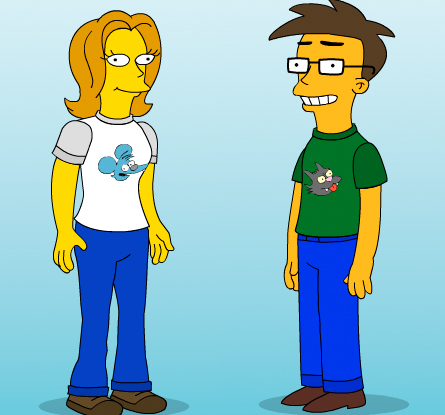
Everyone’s doing it, and you can go to The Simpsons Movie website to do it, too.
Going along with the 7-11 and Kwik-E-Mart post from earlier, Rebecca turned us into Simpsons characters.
Everyone’s doing it, and you can go to The Simpsons Movie website to do it, too.
I’m often a fan of the keynotes that Steve Jobs gives at either MacWorld Expo or the WWDC, and the one today has left me with a lot of mixed feelings. Either way, no matter what happens at these events, you expect something to wow you. Big or little, I usually feel like something cool just happened.
Today, I just didn’t get that feeling.
Ok, I am not forgetting that this is the “World Wide Developers Conference”, so these guys are concerned about hardware as much as they are the lines of code that they can manipulate and build cool software with, so I wasn’t expecting much in the way of product updates and launches.
Jobs, instead, gives us a demo of the really cool features that Apple is excited about and think will be uber sweet for us, the consumers, to get our hands on… again. I mean, there were a few, new neat things announced, but we saw this same keynote in January. Left me feeling a little let down, but there were some interesting things announced today that made me chime into the “cool” vibe that Steve was touting.
The next version of Mac OS X is $129 across the board, for all flavors. Boot Camp will be built-in, so you’ll be able to run XP and Vista out of the box. A new Finder, but that gives me reason to pause in that I’ll have to relearn a few things, no biggie. Anything that helps file management and work flow is a great concept to me.
They also announced a Windows version of Safari, and I am debating with myself as to how I feel about it. As cool as Safari looks, there are elements about it that I can’t handle when it comes to making it my default browser. Maybe version 3 will change my mind, but I’m still resisting the urge to download the beta for now. Bottom line, Safari beach-balls on me too often for me to go back to it, but my mind remains constantly open.
On top of that, Apple launched a redesign to their website. It has a heavy Web 2.0 look and feel to it now, complete with fun AJAX things here and there. Looks nice.
Other than that, not too much else sticks out to me. iPhone still sounds cool, I hope it works well when it’s released, and making software for it sounds pretty easy if you are skilled at making web applications in general. I think I’d be more excited about the outcome if this new OS was coming out next month and not October, but the waiting is half the fun. Kinda.
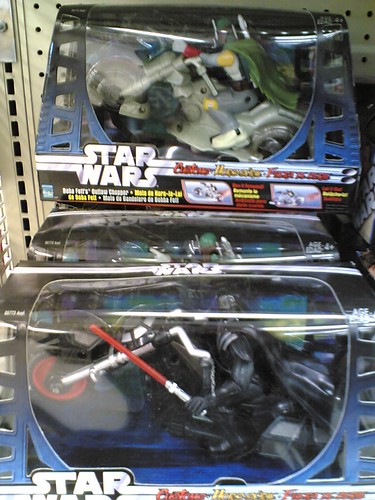 I realize that it’s the 30th anniversary of Star Wars this week, but what really gets to me is this action figure package that I found in a Toys R’ Us a few weeks ago.
When, at any point, did Boba Fett[wiki] or Darth Vader[wiki] ride a motorcycle? And if they did anything remotely close to riding a said, similar vehicle, you can bet your butt that it didn’t have wheels on it. Am I right or am I right?
Don’t get me wrong, I loved the first three flicks. We even taped Star Wars[imdb] onto beta when they played it on national TV, and I watched that tape over and over until you could barely make out the video on the screen. I must have been four at the time, and affinity has wained very little, more so for the original three. As cool as Samual Jackson is with a light saber, I just can’t wrap my appreciation around the last three. Well, the battle with all the wookies in #3 was pretty awesome, but the rest left me a little unsatisfied.
Alas, the 30 year empire of George Lucas[wiki] is going strong. Good for him, but senseless toys like this make me sad. Legos I get, but stuff that wasn’t even in the movie is just ridiculous.
My post about attending the SuperHappyDevHouse at the Bryght offices in Vancouver was pretty last minute, so I thought I would do my best to give a post-game reaction to the festivities.
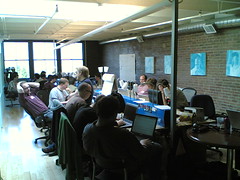 In all honesty, I went there with the intent of doing something kinda geeky and fun, but the fun really got put in front of the geeky. While the true hackers and do’ers were on the main floor doing some, what looked like, intense coding, I was manning the grill for hot action with some brats. And the way the sun was shining on the rooftop patio, I quickly made myself at home up there. The keg was up there too, so I was far from alone.
Talked to a lot of really cool folks while I was up there. In no particular order, Jordan Behan, Roland Tanglao, Jason Vanderhill, Boris Mann, Richard Eriksson, Kris Krug, Ianiv, Ivan, John Biehler, and big shout outs to good pals Duane Storey and the Dave Olsen.
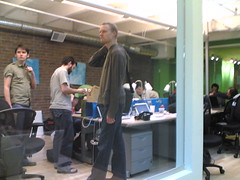 I’m unaware if anything monumental came from the event, but there were a chunk of folks who were looking to do something that sounded neat. I don’t think that I was completely out of my element there, but hard coding is a tad out of the realms of the things I know and like to do. I overheard that one of said coders asked Rebecca why she was there once they found out that she was “just a blogger“.
Bottom line, I had a lot of fun. People that I hung around and chatted with were a great group of folks, and we certainly had a good exchange of ideas, concepts, slams, jokes, laughter, and so on. Being that I have a few Drupal projects that I have been working on, these are the right folks to be talking to.
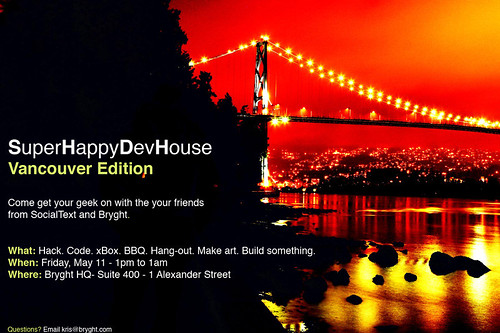
Not sure what trouble I’ve signed up for, but this sounds like a good time. Compared to some of the folks that will be attending this, they will completely put me to shame with their talents and geeky ninja stylings. It doesn’t help that I’m posting this completely last minute, but something is better than nothing.
If you want to attend, sign up on Upcoming.org or get yourself on the SocialText Wiki.
I’ve been working on a few projects involving Drupal, and these are the folks to be talking to about it. Hopefully the whole night won’t be laced with geeky work talk, but worse things could happen. You could feed a bunch of geeks alcohol. God help us with what could happen next.
The cheese fell between the counter and the fridge.
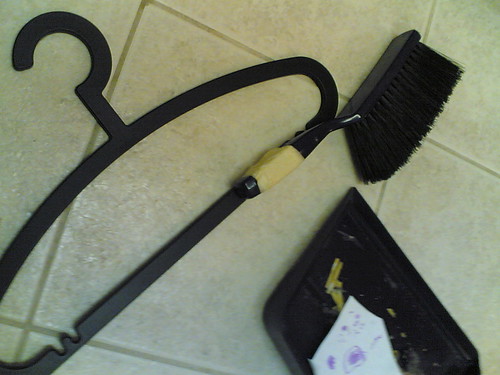
This is what you do so you don’t hurt your back or pinch your fingers while trying to get the cheese you sent flying across the counter and into that tight space between said place. Don’t ask me to explain how. The cheese grater just slipped.
Doing stuff like this always takes me back to the days of KRUI where this type of rigging was far too common, if not being too far from an exact replica. We called it “ghetto engineering”. This is a testament to those quick thinking skills that still exist today.
It’s a little late to be posting this, and my vision is slightly blurry from passing out on the couch. Still, just checked a few sites and some folks are passing this word on. I figure that I should pay it forward as well. Ugh… Did I just use a crappy Hollywood reference?
If you’ve upgraded to the world of WordPress 2.1.1, you are in considerable danger. Nothing life threatening, but before some dude from Turkey cracks into your blog, you need to update your installation to version 2.1.2.
A hacker was able to add a vulnerability to the version of 2.1.1 that was pushed out about a week or so ago, but those still in the world of 2.0.x are fine for now. Essentially, it was a back door that got in by some dude who really, really sucks. So do the right thing and get yourself covered. I’m sure they are trolling for whatever they can get into as you read this.
A recent update to my Mac came down. It was for the change to daylight savings time[wiki], being that it has changed as of 2007.
I’ve got some top secret news which won’t be revealed to the general public until March 11, 2007. Unwary people will be getting a rude awakening. On that day, in accordance with the Energy Policy Act of 2005, people in most states of the U.S. will turn their clocks forward one hour at 2:00 a.m. to take advantage of longer daylight hours and reduced energy bills.
Previously, Daylight Savings Time was implemented on the first Sunday of April and ended on the last Sunday in October for participating states (Indiana, split between two time zones, didn’t’ participate). The passage of the Energy Act of 2005 now puts the end of daylight saving time to the first Sunday in November. In total, Americans will have about a month of additional daylight to get their chores done. The change is expected to advantage children who celebrate Halloween by ‘trick or treating’, and also to cut down on traffic accidents, many of which occur in the twilight drive-time hours. [associatedcontent]
Now, you know that there are going to be a core of people who have no clue that this has changed, and it’s probably the same group of people who forget to set their clocks one hour ahead when the changes happened before. Still, this is a problem that is going to affect a lot of people. Their schedules will be messed up, and it’s a good bet that a lot of folks will miss church on Sunday.
That little update that came down is the kicker, and some people are screaming the return of Y2K[wiki]. We all know what happened then, but it was kinda hard to miss. This? I’m not so sure that throngs of people are aware that when the change happens, their computers and other electronic gadgets that normally change on their own will have missed the memo[cnet]. Will they still show up to work late on Monday? That remains to be seen.
Still, another thing to worry about with the changing of the clocks. First you lose an hour of sleep, then you have to adjust to the change. When it’s time for you to go to bed, your internal clock says you’re not ready. So with a whole month to change that, how much more can we get screwed up?
By the way, this is your warning. Just doing my part to spread the word because Canada is apart of this as much as the U.S. made the switch.
This has been a problem of mine for the past year. The internal speakers on my PowerBook G4 just stopped working one day, but the headphone jack still operates without a problem. There is the fact that this thing is nearly four years old and the first generation of the 17-inch models. You would think that they just broke and wouldn’t want to put out audio because its senior citizen status when it comes to the world of computers. It’s not the case, and long story short, it has to be a software problem.
I’ve done numerous things over the past few days. Actually, I’ve tried a few various times, mostly whenever I have the patience and courage to try some potential solutions. Still nothing works.
I’ve basically tried everything that I could find here with no success. You can even find a post there by yours truly, begging for answers.
My pursuit will continue, but I doubt that I’ll be successful. Dealing with a sinus thing over the past three days, I’ve given it a good try. I know, get something new. Wish it was that easy. This baby needs to last me just a little while longer.
 A story that I caught over on BoingBoing has me fascinated. The basic low down is that one night in November of 1987, a couple of TV stations in the Chicago area were hijacked of their signals. This means that someone had the right knowledge and equipment to pull off this amazing stunt. For a brief period of time, people were treated to a guy in a Max Headroom[wiki] mask with a moving background and garbled audio.
You can see the event transpire on WTTW[wiki] as it actually aired during an episode of Doctor Who[wiki] via this YouTube link. I know that if I would have caught this in 1987, when I was nine, I would have been creeped out. Below is a CBS news report detailing the event[wiki].
The fine for a prank like this from the FCC isn’t cheap, and the “masked man” was never found. Getting onto WGN[wiki] is what really blows my mind. Even though that attempt didn’t last very long, you’d have to be close by to get it to work. However, you think someone would notice a bunch of people hauling large pieces of broadcasting equipment around. Also, you can see in both of these video examples that there was at least another person who helped pull this off. Curious that after nearly twenty years, the secret has remained safe.
The BoingBoing post goes on to point to other links that further the background of this story, and I’ll post them here as well because they are nothing short of incredible pieces of underground history. Damn Interesting has an article about the event itself, especially a closer look at the audio from the signal hijack of WTTW. Signaltonoise offers further background on the incident involving Captain Midnight’s hijacking of HBO in the year prior[wiki], which the CBS report mentions above.
I instantly sent this to my former chief engineer at WSUI because he eats up this stuff just like I do. Jim has some experience dealing with the realm of TV as well as radio, and we both worked in tandem with a bunch of TV guys. Of course, he still does.
“This would be much tougher now a days. With the digital links in place the pirate would have to shell out bigger dollars for the digital modulator. Sometimes hackers do find a way to edge into this stuff on the cheap. I kind of remember the hubbub of the day.”
– Jim
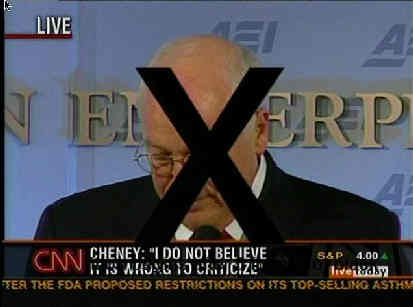 As much as TV is changing to a more IP delivered system, you know that this will inspire someone to try something just as daunting. They go to great lengths to keep those systems closed, but nothing is ever secure enough to someone who really wants to stir something up. Just look at what happened during an airing of a press conference with Dick Cheney on CNN in November of 2005. A producer exercised their feelings about him by slapping a big “X” graphic on his face during the live feed, and CNN dropped the producer when it was discovered to not be an accident or technical error.
The human will is a marvelous thing, and this is the most incredible element in all of this. Fines and security won’t stop someone who really wants to stir things up. I would bet that this got a lot harder to do, especially after 1987.